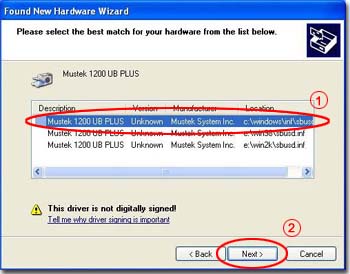
please select "c:\windows\inf."
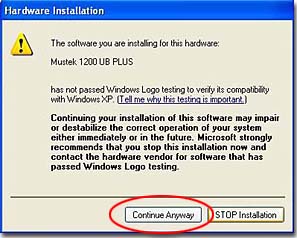
please click "continue."
| How to Install Mustek Windows XP- Compatible Scanner | |
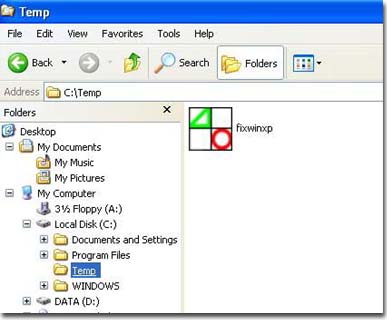
| 1. Please copy FixWinXP.exe to your harddisk. | |
|
|
| 2. Run FixWinXP.exe. | |
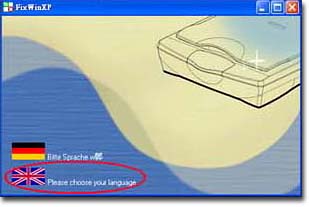
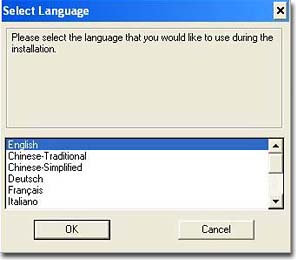
| 3. Select your preferred language for installation instructions. | |
|
|
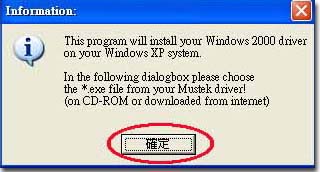
| 4. Please set the install directory to the CD-ROM installer directory. | |
|
|
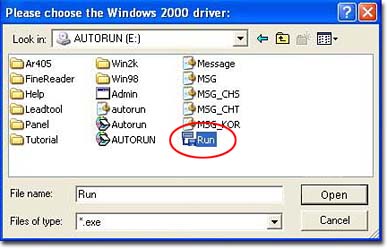
| 5. And then select Run.exe under that directory. | |
|
|
| 6. Select your preferred language for program's interface. | |
|
|
| 7. Welcome message. Please click "Next." | |
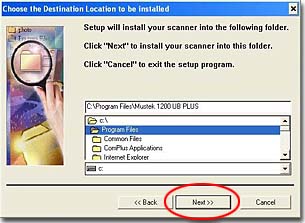
| 8. Select a directory for installation. Please click "Next." | |
|
|
| 9. Select your installation configuration. Please click "Next." | |
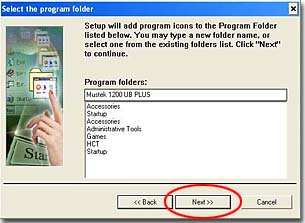
| 10. Select an installation folder. Please click "Next." | |
|
|
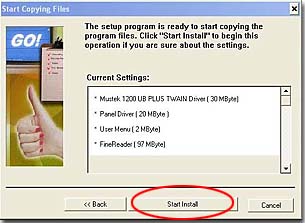
| 11. To install, please click "OK." | |
|
|
| 12. After a successful installation, reboot your computer. | |
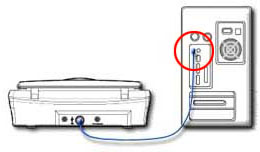
| 13. Please connect your scanner to your computer's USB port. | |
|
|
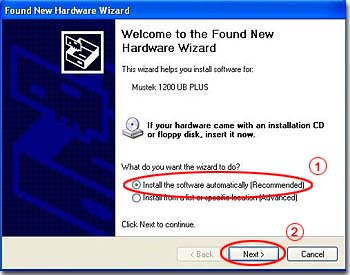
| 14. Your system will report it has found new hardware. Please select auto installation and then click "Next." | |
|
|
| 15. The
system will show you a list of sources, please select "c:\windows\inf." |
|
|
|
| 16. The
system will inform you this scanner's driver has not been certified by Microsoft,
please click "continue." |
|
|
|
| 17. Click "Finish" to end scanner driver installation. | |